
Tooltip Layer for Slint
KitTooltipLayer · Slint Kit 0.3.1
Window layer displaying the focused target’s tooltip.
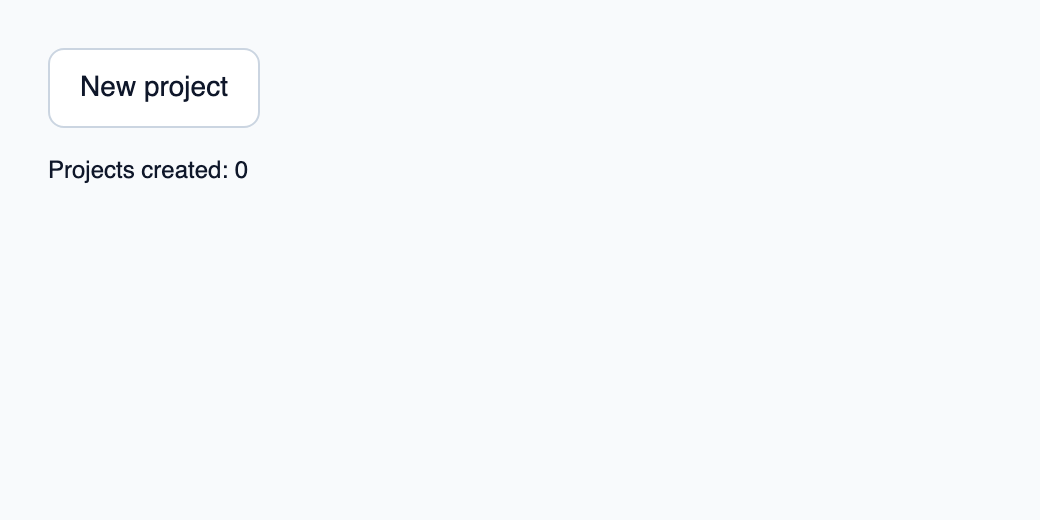
Try the component
Download the complete project, extract it and run cargo run --locked in its folder. Rust 1.92+; Slint Kit 0.3.0 from crates.io. You can also copy the four files below.
Hover or focus New project to see the tooltip; activating the button updates the Rust counter.
ui/app.slint
export { KitFormValidation, HtmlInputKind, NumberInputFormat, KitInputConstraints, KitValidationResult, KitValidityState } from "@kit/kit.slint";
// SPDX-License-Identifier: GPL-3.0-or-later
import { KitTooltip, KitTooltipLayer, KitButton, KitTheme, KitThemes } from "@kit/kit.slint";
export component App inherits Window {
    title: "KitTooltipLayer example";
    preferred-width: 520px;
    preferred-height: 260px;
    max-width: 100000px;
    max-height: 100000px;
    background: root.theme.canvas;
    in-out property <KitTheme> theme: KitThemes.light;
    in property <int> created;
    callback create();
    VerticalLayout {
        padding: 24px;
        spacing: 16px;
        alignment: start;
        tip := KitTooltip {
            theme: root.theme; text: "Create a project in this workspace.";
            target-focused: create-button.has-focus;
            viewport-width: root.width; viewport-height: root.height;
            create-button := KitButton { theme: root.theme; text: "New project"; activated => { root.create(); } }
        }
        result := Text { text: "Projects created: " + root.created; color: root.theme.text-primary; }
    }
    layer := KitTooltipLayer { viewport-width: root.width; viewport-height: root.height; }
}
src/main.rs
// SPDX-License-Identifier: GPL-3.0-or-later
use slint::ComponentHandle;

mod ui { slint::include_modules!(); }
fn main() -> Result<(), slint::PlatformError> {
    let app = ui::App::new()?;
    slint_kit::init_form_validation!(ui, app);
    let weak = app.as_weak();
    app.on_create(move || { if let Some(app) = weak.upgrade() { app.set_created(app.get_created().checked_add(1).expect("project counter")); } });
    app.run()
}
Cargo.toml and build.rs
Cargo.toml
[package]
name = "slint-kit-tooltip-layer-example"
version = "0.1.0"
edition = "2024"
rust-version = "1.92"
license = "GPL-3.0-or-later"
publish = false

[dependencies]
slint-kit = "=0.3.0"
slint = { version = "=1.18.1", default-features = false, features = ["std", "compat-1-18", "backend-winit", "renderer-skia", "accessibility"] }

[build-dependencies]
slint-kit-build = "=0.3.0"

[workspace]
build.rs
fn main() { slint_kit_build::compile("ui/app.slint").expect("compile component example"); }
Files: Cargo.toml · build.rs · ui/app.slint · src/main.rs
Mount one instance last at each window root and supply viewport-width and viewport-height. Disable enabled when a modal or another screen hides triggers.
Placement uses window coordinates to avoid clipping by scrolling ancestors. The layer contains no focus targets, and dismiss() hides the current owner.
Visual composition
The file below produces the screenshot. For controller-driven components, it shows the displayed state without supplying the Rust wiring. Create a project.
Show the screenshot source
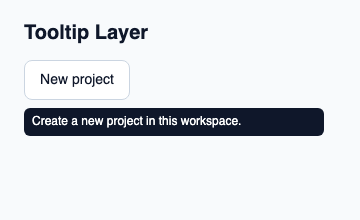
// SPDX-License-Identifier: GPL-3.0-or-later
import { KitButton, KitTheme, KitThemes, KitTooltip, KitTooltipLayer } from "@kit/kit.slint";

export component Example inherits Window {
    title: "KitTooltipLayer example";
    preferred-width: 360px;
    preferred-height: 220px;
    max-width: 100000px;
    max-height: 100000px;
    background: root.theme.canvas;
    in-out property <KitTheme> theme: KitThemes.light;
    in-out property <string> status;
    VerticalLayout {
        padding: 24px; spacing: 16px; alignment: start;
        Text { text: "Tooltip Layer"; color: root.theme.text-primary; font-size: 20px * root.theme.text-scale; font-weight: 600; }
        KitTooltip { theme: root.theme; text: "Create a new project in this workspace."; target-focused: true; viewport-width: root.width; viewport-height: root.height; KitButton { theme: root.theme; text: "New project"; activated => { root.status = "Action requested"; } } }
        if root.status != "": Text { text: root.status; color: root.theme.text-secondary; font-size: 12px * root.theme.text-scale; wrap: word-wrap; }
    }
    KitTooltipLayer { viewport-width: root.width; viewport-height: root.height; }
}
Public API
Inherits Rectangle.
Properties
| Name | Type | Direction |
|---|---|---|
enabled |
bool |
in |
viewport-width |
length |
in |
viewport-height |
length |
in |
Functions
dismiss()