
Field for Slint
KitField · Slint Kit 0.3.0
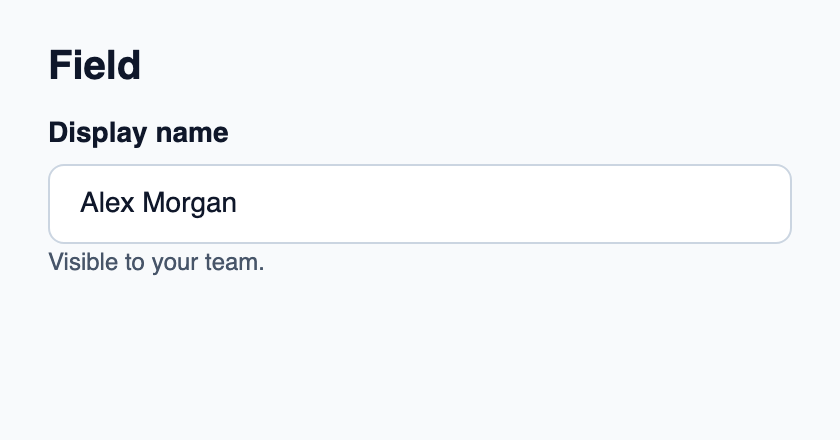
Basic column that groups a label, editor and supporting messages.
Try the component
Download the complete project, extract it and run cargo run --locked in its folder. Rust 1.92+; Slint Kit 0.3.0 from crates.io. You can also copy the four files below.
Click the label, then type in the focused native editor.
ui/app.slint
export { KitFormValidation, HtmlInputKind, NumberInputFormat, KitInputConstraints, KitValidationResult, KitValidityState } from "@kit/kit.slint";
// SPDX-License-Identifier: GPL-3.0-or-later
import { KitField, KitFieldDescription, KitFieldLabel, KitTextField, KitTheme, KitThemes } from "@kit/kit.slint";

export component App inherits Window {
    title: "KitField example";
    preferred-width: 420px;
    preferred-height: 220px;
    max-width: 100000px;
    max-height: 100000px;
    background: root.theme.canvas;
    in-out property <KitTheme> theme: KitThemes.light;
    in-out property <string> draft-0: "Alex Morgan";
    VerticalLayout {
        padding: 24px; spacing: 16px; alignment: start;
        Text { text: "Field"; color: root.theme.text-primary; font-size: 20px * root.theme.text-scale; font-weight: 600; }
        KitField { KitFieldLabel { theme: root.theme; text: "Display name";  focus-requested => { editor.take-focus(); } } editor := KitTextField { theme: root.theme; text <=> root.draft-0; } KitFieldDescription { theme: root.theme; text: "Visible to your team."; } }
    }
}
src/main.rs
// SPDX-License-Identifier: GPL-3.0-or-later
slint::include_modules!();

fn main() -> Result<(), slint::PlatformError> {
    let app = App::new()?;
    slint_kit::init_form_validation!(self, app);
    app.run()
}
Cargo.toml and build.rs
Cargo.toml
[package]
name = "slint-kit-field-example"
version = "0.1.0"
edition = "2024"
rust-version = "1.92"
license = "GPL-3.0-or-later"
publish = false

[dependencies]
slint-kit = "=0.3.0"
slint = { version = "=1.18.1", default-features = false, features = ["std", "compat-1-18", "backend-winit", "renderer-skia", "accessibility"] }

[build-dependencies]
slint-kit-build = "=0.3.0"

[workspace]
build.rs
fn main() {
    slint_kit_build::compile("ui/app.slint").expect("compile component example");
}
Files: Cargo.toml · build.rs · ui/app.slint · src/main.rs
Compose KitFieldLabel, a control and KitFieldDescription or KitFieldError in that order. Use KitFieldGroup between multiple fields.
It applies the kit’s help spacing and keeps its natural height. It owns no value or validation state.
Visual composition
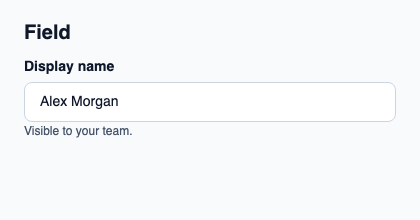
The file below produces the screenshot. For controller-driven components, it shows the displayed state without supplying the Rust wiring. Create a project.
Show the screenshot source
// SPDX-License-Identifier: GPL-3.0-or-later
import { KitField, KitFieldDescription, KitFieldLabel, KitTextField, KitTheme, KitThemes } from "@kit/kit.slint";

export component Example inherits Window {
    title: "KitField example";
    preferred-width: 420px;
    preferred-height: 220px;
    max-width: 100000px;
    max-height: 100000px;
    background: root.theme.canvas;
    in-out property <KitTheme> theme: KitThemes.light;
    in-out property <string> status;
    VerticalLayout {
        padding: 24px; spacing: 16px; alignment: start;
        Text { text: "Field"; color: root.theme.text-primary; font-size: 20px * root.theme.text-scale; font-weight: 600; }
        KitField { KitFieldLabel { theme: root.theme; text: "Display name"; } KitTextField { theme: root.theme; text: "Alex Morgan"; } KitFieldDescription { theme: root.theme; text: "Visible to your team."; } }
        if root.status != "": Text { text: root.status; color: root.theme.text-secondary; font-size: 12px * root.theme.text-scale; wrap: word-wrap; }
    }
}
Public API
Inherits VerticalLayout.