
Couche d’infobulles pour Slint
KitTooltipLayer · Slint Kit 0.3.0
Couche de fenêtre affichant l’infobulle de la cible ayant le focus.
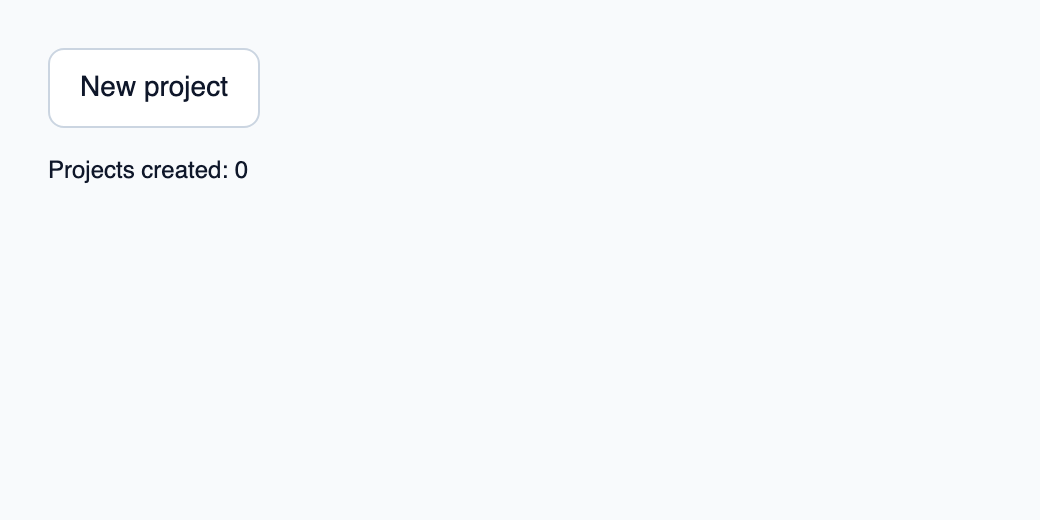
Essayer le composant
Télécharger le projet complet, le décompresser et lancer cargo run --locked dans son dossier. Rust 1.92+ ; Slint Kit 0.3.0 depuis crates.io. Vous pouvez aussi copier les quatre fichiers ci-dessous.
Survolez ou focalisez New project pour afficher l’infobulle ; activer le bouton actualise le compteur Rust.
ui/app.slint
export { KitFormValidation, HtmlInputKind, NumberInputFormat, KitInputConstraints, KitValidationResult, KitValidityState } from "@kit/kit.slint";
// SPDX-License-Identifier: GPL-3.0-or-later
import { KitTooltip, KitTooltipLayer, KitButton, KitTheme, KitThemes } from "@kit/kit.slint";
export component App inherits Window {
    title: "KitTooltipLayer example";
    preferred-width: 520px;
    preferred-height: 260px;
    max-width: 100000px;
    max-height: 100000px;
    background: root.theme.canvas;
    in-out property <KitTheme> theme: KitThemes.light;
    in property <int> created;
    callback create();
    VerticalLayout {
        padding: 24px;
        spacing: 16px;
        alignment: start;
        tip := KitTooltip {
            theme: root.theme; text: "Create a project in this workspace.";
            target-focused: create-button.has-focus;
            viewport-width: root.width; viewport-height: root.height;
            create-button := KitButton { theme: root.theme; text: "New project"; activated => { root.create(); } }
        }
        result := Text { text: "Projects created: " + root.created; color: root.theme.text-primary; }
    }
    layer := KitTooltipLayer { viewport-width: root.width; viewport-height: root.height; }
}
src/main.rs
// SPDX-License-Identifier: GPL-3.0-or-later
use slint::ComponentHandle;

mod ui { slint::include_modules!(); }
fn main() -> Result<(), slint::PlatformError> {
    let app = ui::App::new()?;
    slint_kit::init_form_validation!(ui, app);
    let weak = app.as_weak();
    app.on_create(move || { if let Some(app) = weak.upgrade() { app.set_created(app.get_created().checked_add(1).expect("project counter")); } });
    app.run()
}
Cargo.toml et build.rs
Cargo.toml
[package]
name = "slint-kit-tooltip-layer-example"
version = "0.1.0"
edition = "2024"
rust-version = "1.92"
license = "GPL-3.0-or-later"
publish = false

[dependencies]
slint-kit = "=0.3.0"
slint = { version = "=1.18.1", default-features = false, features = ["std", "compat-1-18", "backend-winit", "renderer-skia", "accessibility"] }

[build-dependencies]
slint-kit-build = "=0.3.0"

[workspace]
build.rs
fn main() { slint_kit_build::compile("ui/app.slint").expect("compile component example"); }
Fichiers : Cargo.toml · build.rs · ui/app.slint · src/main.rs
Montez une seule instance en dernier à la racine de chaque fenêtre et fournissez viewport-width et viewport-height. Désactivez enabled lorsqu’une modale ou un écran cache les déclencheurs.
Le placement utilise les coordonnées de fenêtre pour éviter le découpage des ancêtres défilants. La couche ne contient aucune cible de focus et dismiss() masque le propriétaire courant.
Composition visuelle
Le fichier ci-dessous produit la capture. Pour les composants pilotés par un contrôleur, il montre l’état affiché sans fournir le branchement Rust. Créer un projet.
Afficher le fichier de la capture
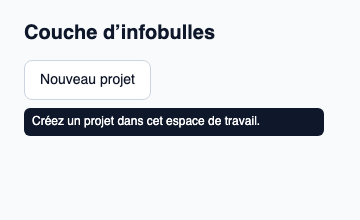
// Public label overrides localize this fixture; toolkit/host defaults keep their language.
// SPDX-License-Identifier: GPL-3.0-or-later
import { KitButton, KitTheme, KitThemes, KitTooltip, KitTooltipLayer } from "@kit/kit.slint";

export component Example inherits Window {
    title: "KitTooltipLayer — exemple";
    preferred-width: 360px;
    preferred-height: 220px;
    max-width: 100000px;
    max-height: 100000px;
    background: root.theme.canvas;
    in-out property <KitTheme> theme: KitThemes.light;
    in-out property <string> status;
    VerticalLayout {
        padding: 24px; spacing: 16px; alignment: start;
        Text { text: "Couche d’infobulles"; color: root.theme.text-primary; font-size: 20px * root.theme.text-scale; font-weight: 600; }
        KitTooltip { theme: root.theme; text: "Créez un projet dans cet espace de travail."; target-focused: true; viewport-width: root.width; viewport-height: root.height; KitButton { theme: root.theme; text: "Nouveau projet"; activated => { root.status = "Action demandée"; } } }
        if root.status != "": Text { text: root.status; color: root.theme.text-secondary; font-size: 12px * root.theme.text-scale; wrap: word-wrap; }
    }
    KitTooltipLayer { viewport-width: root.width; viewport-height: root.height; }
}
API publique
Hérite de Rectangle.
Propriétés
| Nom | Type | Sens |
|---|---|---|
enabled |
bool |
in |
viewport-width |
length |
in |
viewport-height |
length |
in |
Fonctions
dismiss()