
Surface for Slint
KitSurface · Slint Kit 0.3.0
Single painted surface for composed content.
Try the component
Download the complete project, extract it and run cargo run --locked in its folder. Rust 1.92+; Slint Kit 0.3.0 from crates.io. You can also copy the four files below.
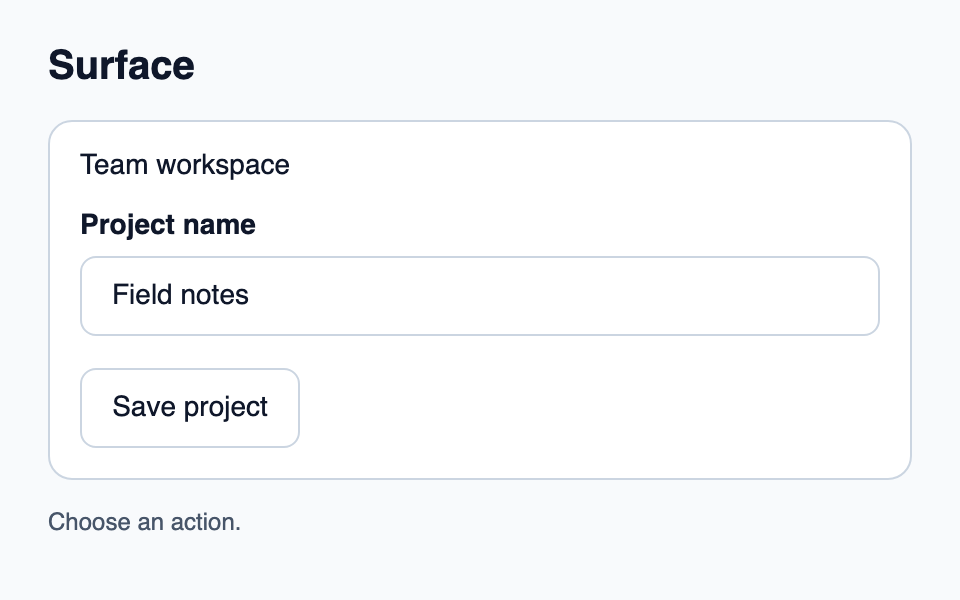
Click Save project: Rust handles the command and updates the action count.
ui/app.slint
export { KitFormValidation, HtmlInputKind, NumberInputFormat, KitInputConstraints, KitValidationResult, KitValidityState } from "@kit/kit.slint";
// SPDX-License-Identifier: GPL-3.0-or-later
import { KitButton, KitSurface, KitTextField, KitTheme, KitThemes } from "@kit/kit.slint";

export enum DemoAction { save-project }

export component App inherits Window {
    title: "KitSurface example";
    preferred-width: 480px;
    preferred-height: 300px;
    max-width: 100000px;
    max-height: 100000px;
    background: root.theme.canvas;
    in-out property <KitTheme> theme: KitThemes.light;
    in-out property <string> draft-0: "Field notes";
    in property <string> status: "Choose an action.";
    callback action-requested(DemoAction);
    VerticalLayout {
        padding: 24px; spacing: 16px; alignment: start;
        Text { text: "Surface"; color: root.theme.text-primary; font-size: 20px * root.theme.text-scale; font-weight: 600; }
        KitSurface { theme: root.theme;Text { text: "Team workspace"; color: root.theme.text-primary; font-size: 14px * root.theme.text-scale; wrap: word-wrap; }KitTextField { theme: root.theme; label: "Project name"; text <=> root.draft-0; }KitButton { theme: root.theme; text: "Save project"; activated => { root.action-requested(DemoAction.save-project); } } }
        Text { text: root.status; color: root.theme.text-secondary; wrap: word-wrap; }
    }
}
src/main.rs
// SPDX-License-Identifier: GPL-3.0-or-later
use slint::ComponentHandle;
use std::cell::Cell;
slint::include_modules!();

fn main() -> Result<(), slint::PlatformError> {
    let app = App::new()?;
    slint_kit::init_form_validation!(self, app);
    let count = Cell::new(0_u32);
    let weak = app.as_weak();
    app.on_action_requested(move |action| {
        if let Some(app) = weak.upgrade() {
            let next = count.get().checked_add(1).expect("action count capacity");
            count.set(next);
            let label = match action {
                DemoAction::SaveProject => "Save project",
            };
            app.set_status(format!("{label} handled by Rust ({next})").into());
        }
    });
    app.run()
}
Cargo.toml and build.rs
Cargo.toml
[package]
name = "slint-kit-surface-example"
version = "0.1.0"
edition = "2024"
rust-version = "1.92"
license = "GPL-3.0-or-later"
publish = false

[dependencies]
slint-kit = "=0.3.0"
slint = { version = "=1.18.1", default-features = false, features = ["std", "compat-1-18", "backend-winit", "renderer-skia", "accessibility"] }

[build-dependencies]
slint-kit-build = "=0.3.0"

[workspace]
build.rs
fn main() {
    slint_kit_build::compile("ui/app.slint").expect("compile component example");
}
Files: Cargo.toml · build.rs · ui/app.slint · src/main.rs
Choose SurfaceLevel.flat or .raised, SurfaceBorder.none or .subtle, then inset and gap. Place content in its children.
It owns the background and padding without intercepting pointer or focus events. Compose an action with KitPressable when a surface should be interactive.
Visual composition
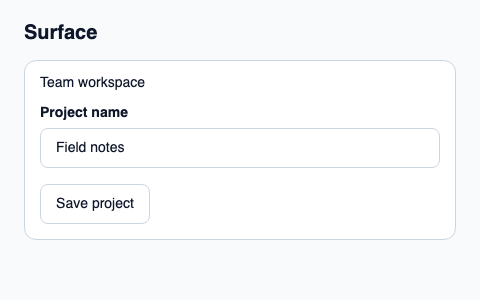
The file below produces the screenshot. For controller-driven components, it shows the displayed state without supplying the Rust wiring. Create a project.
Show the screenshot source
// SPDX-License-Identifier: GPL-3.0-or-later
import { KitButton, KitSurface, KitTextField, KitTheme, KitThemes } from "@kit/kit.slint";

export component Example inherits Window {
    title: "KitSurface example";
    preferred-width: 480px;
    preferred-height: 300px;
    max-width: 100000px;
    max-height: 100000px;
    background: root.theme.canvas;
    in-out property <KitTheme> theme: KitThemes.light;
    in-out property <string> status;
    VerticalLayout {
        padding: 24px; spacing: 16px; alignment: start;
        Text { text: "Surface"; color: root.theme.text-primary; font-size: 20px * root.theme.text-scale; font-weight: 600; }
        KitSurface { theme: root.theme;Text { text: "Team workspace"; color: root.theme.text-primary; font-size: 14px * root.theme.text-scale; wrap: word-wrap; }KitTextField { theme: root.theme; label: "Project name"; text: "Field notes"; }KitButton { theme: root.theme; text: "Save project"; activated => { root.status = "Action requested"; } } }
        if root.status != "": Text { text: root.status; color: root.theme.text-secondary; font-size: 12px * root.theme.text-scale; wrap: word-wrap; }
    }
}
Public API
Inherits Rectangle.
Properties
| Name | Type | Direction |
|---|---|---|
theme |
KitTheme |
in |
level |
SurfaceLevel |
in |
border |
SurfaceBorder |
in |
inset |
LayoutSpace |
in |
gap |
LayoutSpace |
in |
Types and variants
| Type | Declaration |
|---|---|
enum LayoutSpace |
none, tight, compact, regular, roomy, section |
enum SurfaceBorder |
none, subtle |
enum SurfaceLevel |
flat, raised |