
Préfixe de champ pour Slint
KitInputGroupStart · Slint Kit 0.3.1
Emplacement horizontal pour les éléments placés avant un éditeur.
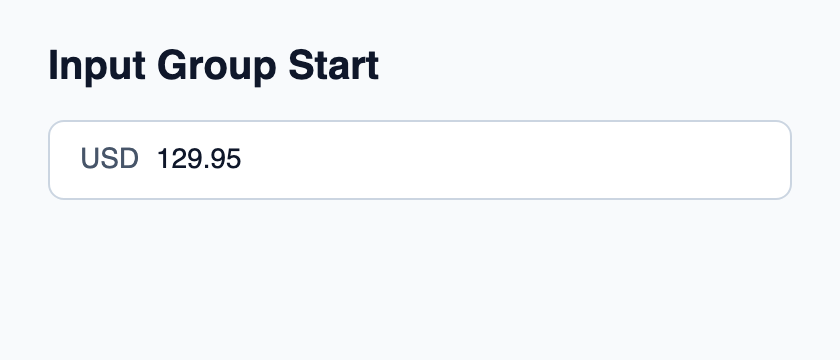
Essayer le composant
Télécharger le projet complet, le décompresser et lancer cargo run --locked dans son dossier. Rust 1.92+ ; Slint Kit 0.3.0 depuis crates.io. Vous pouvez aussi copier les quatre fichiers ci-dessous.
Cliquez sur le champ natif et modifiez son texte ; le préfixe ou suffixe reste séparé de la valeur éditable.
ui/app.slint
export { KitFormValidation, HtmlInputKind, NumberInputFormat, KitInputConstraints, KitValidationResult, KitValidityState } from "@kit/kit.slint";
// SPDX-License-Identifier: GPL-3.0-or-later
import { KitInputGroup, KitInputGroupStart, KitInputGroupText, KitTheme, KitThemes } from "@kit/kit.slint";

export component App inherits Window {
    title: "KitInputGroupStart example";
    preferred-width: 420px;
    preferred-height: 180px;
    max-width: 100000px;
    max-height: 100000px;
    background: root.theme.canvas;
    in-out property <KitTheme> theme: KitThemes.light;
    in-out property <string> draft-0: "129.95";
    VerticalLayout {
        padding: 24px; spacing: 16px; alignment: start;
        Text { text: "Input Group Start"; color: root.theme.text-primary; font-size: 20px * root.theme.text-scale; font-weight: 600; }
        KitInputGroup {
            theme: root.theme; focused: editor.has-focus;
            HorizontalLayout {
                spacing: 8px;
                KitInputGroupStart { KitInputGroupText { theme: root.theme; text: "USD"; } }
                Rectangle {
                    horizontal-stretch: 1; min-width: 0px; clip: true;
                    viewport := Flickable {
                        interactive: false;
                        content-width: max(self.width, editor.preferred-width + 2px);
                        content-height: self.height;
                        editor := TextInput {
                            width: viewport.content-width; height: viewport.height;
                            single-line: true; input-type: InputType.decimal;
                            accessible-label: "Amount";
                            font-size: 14px * root.theme.text-scale;
                            horizontal-alignment: left; vertical-alignment: center;
                            text <=> root.draft-0; color: root.theme.text-primary;
                            cursor-position-changed(position) => {
                                if (position.x + viewport.content-x < 0px) {
                                    viewport.content-x = -position.x;
                                } else if (position.x + 2px + viewport.content-x > viewport.width) {
                                    viewport.content-x = viewport.width - position.x - 2px;
                                }
                            }
                        }
                    }
                }

            }
        }
    }
}
src/main.rs
// SPDX-License-Identifier: GPL-3.0-or-later
slint::include_modules!();

fn main() -> Result<(), slint::PlatformError> {
    let app = App::new()?;
    slint_kit::init_form_validation!(self, app);
    app.run()
}
Cargo.toml et build.rs
Cargo.toml
[package]
name = "slint-kit-input-group-start-example"
version = "0.1.0"
edition = "2024"
rust-version = "1.92"
license = "GPL-3.0-or-later"
publish = false

[dependencies]
slint-kit = "=0.3.0"
slint = { version = "=1.18.1", default-features = false, features = ["std", "compat-1-18", "backend-winit", "renderer-skia", "accessibility"] }

[build-dependencies]
slint-kit-build = "=0.3.0"

[workspace]
build.rs
fn main() {
    slint_kit_build::compile("ui/app.slint").expect("compile component example");
}
Fichiers : Cargo.toml · build.rs · ui/app.slint · src/main.rs
Composez-le à côté du vrai éditeur dans KitInputGroup, avec une icône ou KitInputGroupText. Laissez l’éditeur recevoir l’espace restant.
Il aligne ses enfants au début et ne s’étire pas horizontalement. Il n’ajoute ni bordure ni padding ni cible de focus.
Composition visuelle
Le fichier ci-dessous produit la capture. Pour les composants pilotés par un contrôleur, il montre l’état affiché sans fournir le branchement Rust. Créer un projet.
Afficher le fichier de la capture
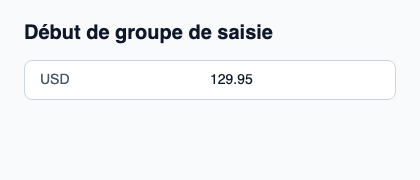
// Public label overrides localize this fixture; toolkit/host defaults keep their language.
// SPDX-License-Identifier: GPL-3.0-or-later
import { KitInputGroup, KitInputGroupStart, KitInputGroupText, KitTheme, KitThemes } from "@kit/kit.slint";

export component Example inherits Window {
    title: "KitInputGroupStart — exemple";
    preferred-width: 420px;
    preferred-height: 180px;
    max-width: 100000px;
    max-height: 100000px;
    background: root.theme.canvas;
    in-out property <KitTheme> theme: KitThemes.light;
    in-out property <string> status;
    VerticalLayout {
        padding: 24px; spacing: 16px; alignment: start;
        Text { text: "Début de groupe de saisie"; color: root.theme.text-primary; font-size: 20px * root.theme.text-scale; font-weight: 600; }
        KitInputGroup { theme: root.theme; HorizontalLayout { spacing: 12px; KitInputGroupStart { KitInputGroupText { theme: root.theme; text: "USD"; } } TextInput { font-size: 14px * root.theme.text-scale; vertical-alignment: center; text: "129.95"; color: root.theme.text-primary; }  } }
        if root.status != "": Text { text: root.status; color: root.theme.text-secondary; font-size: 12px * root.theme.text-scale; wrap: word-wrap; }
    }
}
API publique
Hérite de HorizontalLayout.