
Surface de sélection pour Slint
KitSelectSurface · Slint Kit 0.3.1
Surface de popup combinant recherche native, clavier et visibilité de l’option active.
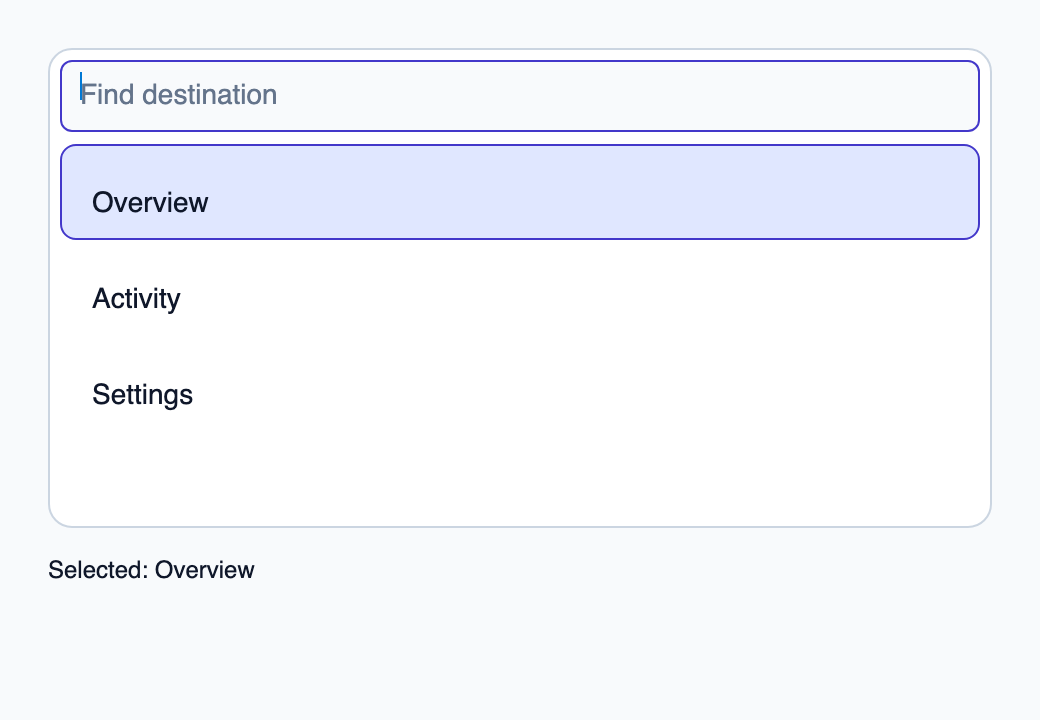
Essayer le composant
Télécharger le projet complet, le décompresser et lancer cargo run --locked dans son dossier. Rust 1.92+ ; Slint Kit 0.3.0 depuis crates.io. Vous pouvez aussi copier les quatre fichiers ci-dessous.
Choisissez Activity au pointeur, ou naviguez au clavier puis appuyez sur Entrée. Rust accepte sa clé.
ui/app.slint
export { KitFormValidation, HtmlInputKind, NumberInputFormat, KitInputConstraints, KitValidationResult, KitValidityState } from "@kit/kit.slint";
// SPDX-License-Identifier: GPL-3.0-or-later
import { KitSelectSurface, KitOption, OptionRow, SelectState, NavigationStep, CloseReason, SelectionAvailability, KitTheme, KitThemes } from "@kit/kit.slint";
export component App inherits Window {
    title: "KitSelectSurface example";
    preferred-width: 520px;
    preferred-height: 360px;
    max-width: 100000px;
    max-height: 100000px;
    background: root.theme.canvas;
    in-out property <KitTheme> theme: KitThemes.light;
    in property <[OptionRow]> rows;
    in property <SelectState> select-state;
    in property <string> selected-label: "Overview";
    in-out property <string> query;
    callback select-open();
    callback select-navigate(NavigationStep);
    callback select-activate(int, int);
    callback select-dismiss(CloseReason);
    callback select-query(string);
    callback select-typeahead(string);
    VerticalLayout {
        padding: 24px;
        spacing: 16px;
        alignment: start;
        control := KitSelectSurface {
            state: root.select-state;
            theme: root.theme; height: 240px; searchable: true; query <=> root.query;
            search-label: "Find destination"; focus-search-on-open: true;
            query-edited(text) => { root.select-query(text); }
            navigate(step) => { root.select-navigate(step); }
            activate(token, generation) => { root.select-activate(token, generation); }
            dismiss(reason) => { root.select-dismiss(reason); }
            typeahead(text) => { root.select-typeahead(text); }
            tab-navigation(reverse) => { return reject; }
            VerticalLayout {
                alignment: start;
                for row in root.rows: KitOption {
                    theme: root.theme; option-data: row; height: 48px;
                    active: root.select-state.active.present && root.select-state.active.token == row.token;
                    selected: root.select-state.selected.present && root.select-state.selected.token == row.token;
                    activate(token, generation) => { root.select-activate(token, generation); }
                    Text { x: 0px; y: 0px; width: parent.width; height: parent.height; horizontal-alignment: left; font-size: 14px * root.theme.text-scale; overflow: elide; text: row.label; color: root.theme.text-primary; vertical-alignment: center; }
                }
            }
        }
        result := Text { text: "Selected: " + root.selected-label; color: root.theme.text-primary; }
    }

}
src/main.rs
// SPDX-License-Identifier: GPL-3.0-or-later
use slint::ComponentHandle;
use slint_kit::{Ownership, SelectOption, SelectionIntent};
#[derive(Clone, Copy, PartialEq, Eq, Hash)]
enum Destination { Overview, Activity, Settings }
impl Destination {
    fn label(self) -> &'static str {
        match self { Self::Overview => "Overview", Self::Activity => "Activity", Self::Settings => "Settings" }
    }
}

mod ui { slint::include_modules!(); }
fn main() -> Result<(), slint::PlatformError> {
    let app = ui::App::new()?;
    slint_kit::init_form_validation!(ui, app);
    let selection = slint_kit::bind_select!(ui, app, vec![
        SelectOption::new(Destination::Overview, "Overview"),
        SelectOption::new(Destination::Activity, "Activity"),
        SelectOption::new(Destination::Settings, "Settings"),
    ], Some(Destination::Overview), Ownership::Local);
    let weak = app.as_weak();
    selection.on_intent(move |intent| {
        if let Some(app) = weak.upgrade() {
            app.set_selected_label(match intent {
                SelectionIntent::Commit(key) => key.label(),
                SelectionIntent::Clear => "No selection",
            }.into());
        }
    });
    selection.open();
    let persistent = selection.clone();
    app.on_select_activate(move |token, generation| {
        persistent.activate(token, generation);
        persistent.open();
    });
    app.run()
}
Cargo.toml et build.rs
Cargo.toml
[package]
name = "slint-kit-select-surface-example"
version = "0.1.0"
edition = "2024"
rust-version = "1.92"
license = "GPL-3.0-or-later"
publish = false

[dependencies]
slint-kit = "=0.3.0"
slint = { version = "=1.18.1", default-features = false, features = ["std", "compat-1-18", "backend-winit", "renderer-skia", "accessibility"] }

[build-dependencies]
slint-kit-build = "=0.3.0"

[workspace]
build.rs
fn main() { slint_kit_build::compile("ui/app.slint").expect("compile component example"); }
Fichiers : Cargo.toml · build.rs · ui/app.slint · src/main.rs
Placez une liste virtualisée de KitOption dans ses enfants et liez scroll-y au défilement de cette liste. Fournissez sa hauteur visible dans viewport-height et une row-height cohérente.
searchable et focus-search-on-open choisissent la présentation et le focus initial. ensure-active-visible() suit state.active-index, tandis que query-edited transmet le brouillon de recherche sans décider de la sélection.
Composition visuelle
Le fichier ci-dessous produit la capture. Pour les composants pilotés par un contrôleur, il montre l’état affiché sans fournir le branchement Rust. Créer un projet.
Afficher le fichier de la capture
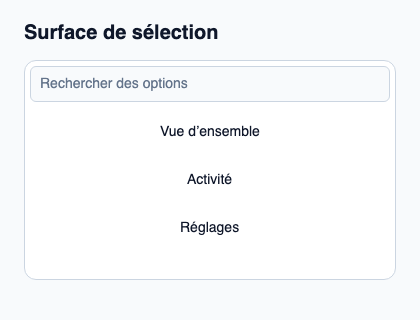
// Public label overrides localize this fixture; toolkit/host defaults keep their language.
// SPDX-License-Identifier: GPL-3.0-or-later
import { KitOption, KitSelectSurface, KitTheme, KitThemes, SelectionAvailability } from "@kit/kit.slint";

export component Example inherits Window {
    title: "KitSelectSurface — exemple";
    preferred-width: 420px;
    preferred-height: 320px;
    max-width: 100000px;
    max-height: 100000px;
    background: root.theme.canvas;
    in-out property <KitTheme> theme: KitThemes.light;
    in-out property <string> status;
    VerticalLayout {
        padding: 24px; spacing: 16px; alignment: start;
        Text { text: "Surface de sélection"; color: root.theme.text-primary; font-size: 20px * root.theme.text-scale; font-weight: 600; }
        KitSelectSurface { empty-label: "Aucune option correspondante"; search-label: "Rechercher des options"; theme: root.theme; height: 220px; state: { open: true, generation: 1, active-index: 0, active: { present: true, token: 11 }, selected: { present: true, token: 11 }, selection-availability: SelectionAvailability.available }; VerticalLayout { for row in [{ token: 11, generation: 1, label: "Vue d’ensemble", description: "Résumé du projet", disabled: false }, { token: 23, generation: 1, label: "Activité", description: "Modifications récentes", disabled: false }, { token: 38, generation: 1, label: "Réglages", description: "Préférences du projet", disabled: false }]: KitOption { theme: root.theme; option-data: row; height: 48px; Text { text: row.label; color: root.theme.text-primary; vertical-alignment: center; font-size: 14px * root.theme.text-scale; } } } }
        if root.status != "": Text { text: root.status; color: root.theme.text-secondary; font-size: 12px * root.theme.text-scale; wrap: word-wrap; }
    }
}
API publique
Hérite de Rectangle.
Propriétés
| Nom | Type | Sens |
|---|---|---|
theme |
KitTheme |
in |
state |
SelectState |
in |
row-height |
length |
in |
viewport-height |
length |
in |
searchable |
bool |
in |
focus-search-on-open |
bool |
in |
empty |
bool |
in |
empty-label |
string |
in |
search-label |
string |
in |
query |
string |
in-out |
scroll-y |
length |
in-out |
active-scroll-y |
length |
out |
Types et variantes
| Type | Déclaration |
|---|---|
enum CloseReason |
escape, outside-press, system-back, trigger-toggle, programmatic, host-closed |
enum NavigationStep |
next, previous, first, last, page-next, page-previous |
enum SelectionAvailability |
absent, available, unavailable |
struct SelectionRef |
present: bool, token: int |
struct SelectState |
selection-availability: SelectionAvailability, selected: SelectionRef, active: SelectionRef, open: bool, active-index: int, generation: int |
Signaux
navigate(NavigationStep)activate(int, int)dismiss(CloseReason)typeahead(string)tab-navigation(bool) → EventResultquery-edited(string)
Fonctions
take-focus()ensure-active-visible()