
Champ couleur pour Slint
KitColorField · Slint Kit 0.3.0
Saisie hexadécimale avec aperçu de couleur et sélecteur contextuel.
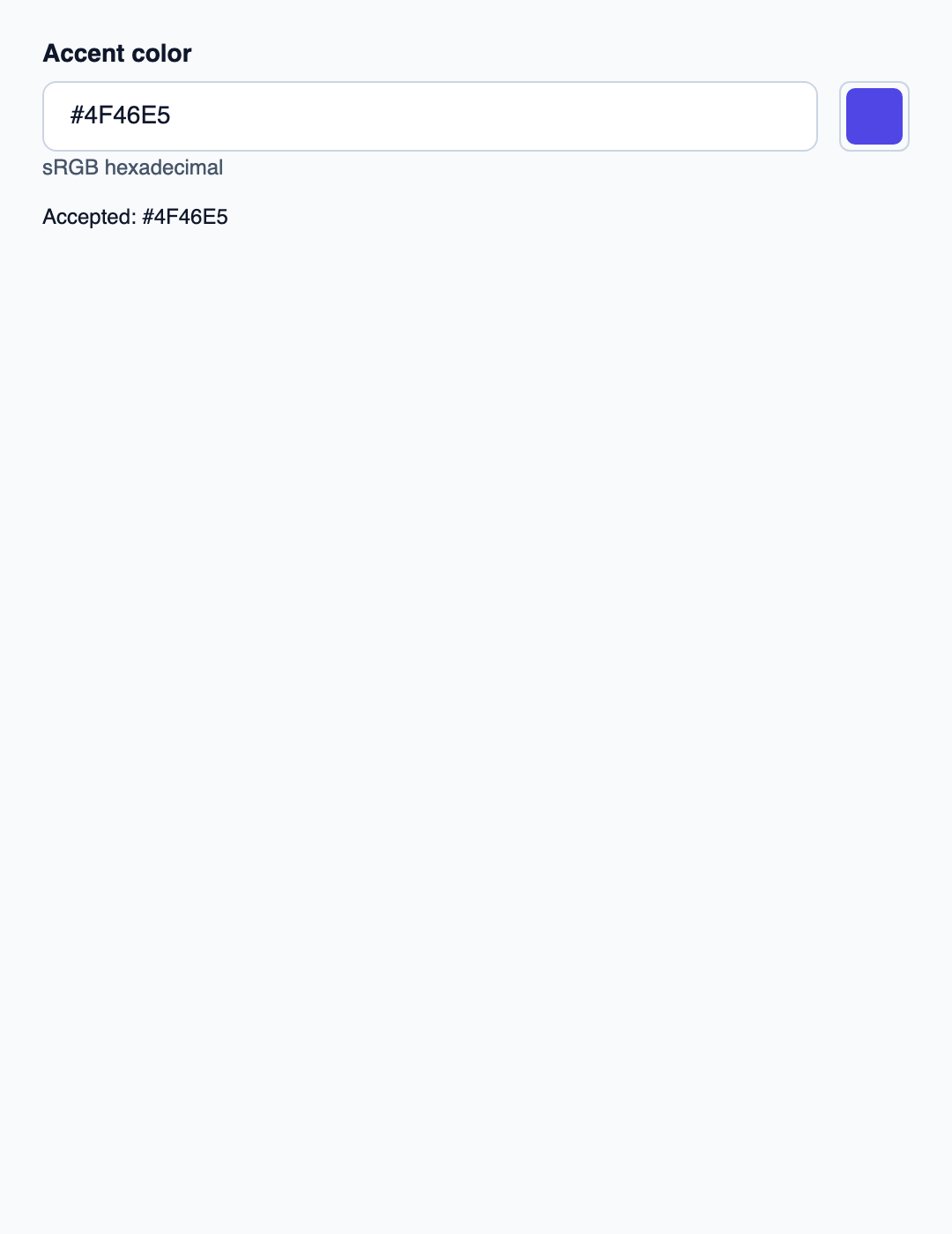
Essayer le composant
Télécharger le projet complet, le décompresser et lancer cargo run --locked dans son dossier. Rust 1.92+ ; Slint Kit 0.3.0 depuis crates.io. Vous pouvez aussi copier les quatre fichiers ci-dessous.
Modifiez une couleur sRGB hexadécimale ou utilisez le sélecteur. Rust valide les octets, sépare les brouillons et projette la couleur acceptée.
ui/app.slint
export { KitFormValidation, HtmlInputKind, NumberInputFormat, KitInputConstraints, KitValidationResult, KitValidityState } from "@kit/kit.slint";
import {KitColorField,KitThemes,SrgbColorView,ColorChannel,NavigationStep} from "@kit/kit.slint";
export {SrgbColorView,ColorChannel,NavigationStep}
export component App inherits Window {
 title:"color-field";preferred-width:540px;preferred-height:700px;max-width:100000px;max-height:100000px;background:KitThemes.light.canvas;
 in-out property <string> hex;in property <string> error;in property <string> accepted;in property <SrgbColorView> color-value;in property <color> swatch;
 callback commit(string);callback edit();callback choose(SrgbColorView);callback cancel();
 VerticalLayout{padding:24px;spacing:16px;alignment:start;
 control:=KitColorField{label:"Accent color";accepted-color:root.color-value;swatch:root.swatch;color-requested(value)=>{root.choose(value);}text<=>root.hex;error:root.error;edited(value)=>{root.edit();}commit-requested(value)=>{root.commit(value);}cancelled=>{root.cancel();}}
 Text{text:"Accepted: "+root.accepted;color:KitThemes.light.text-primary;wrap:word-wrap;}
 }
}
src/main.rs
use slint::ComponentHandle;
use slint_kit::{AlphaPolicy, DraftValue, SrgbColor};
use std::{cell::RefCell, rc::Rc};
mod ui {
    slint::include_modules!();
}
fn publish(app: &ui::App, color: SrgbColor, accepted: bool) {
    app.set_hex(color.hex(AlphaPolicy::Opaque).into());
    app.set_color_value(ui::SrgbColorView {
        red: color.red.into(),
        green: color.green.into(),
        blue: color.blue.into(),
        alpha: 255,
    });
    app.set_swatch(slint::Color::from_rgb_u8(
        color.red,
        color.green,
        color.blue,
    ));
    if accepted {
        app.set_accepted(color.hex(AlphaPolicy::Opaque).into());
    }
}
fn main() -> Result<(), slint::PlatformError> {
    let app = ui::App::new()?;
    slint_kit::init_form_validation!(ui, app);
    let initial = SrgbColor {
        red: 79,
        green: 70,
        blue: 229,
        alpha: 255,
    };
    let state = Rc::new(RefCell::new((initial, initial)));
    publish(&app, initial, true);
    let weak = app.as_weak();
    let shared = state.clone();
    app.on_commit(move |text| {
        if let Some(app) = weak.upgrade() {
            match SrgbColor::parse_hex(&text, AlphaPolicy::Opaque) {
                DraftValue::Parsed(value) => {
                    *shared.borrow_mut() = (value, value);
                    publish(&app, value, true);
                    app.set_error("".into());
                }
                _ => app.set_error("Use #RRGGBB or #RGB hexadecimal".into()),
            }
        }
    });
    let weak = app.as_weak();
    app.on_edit(move || {
        if let Some(app) = weak.upgrade() {
            app.set_error("".into());
        }
    });
    let weak = app.as_weak();
    let shared = state.clone();
    app.on_choose(move |view| {
        if let Some(app) = weak.upgrade() {
            if let (Ok(red), Ok(green), Ok(blue)) = (
                view.red.try_into(),
                view.green.try_into(),
                view.blue.try_into(),
            ) {
                let color = SrgbColor {
                    red,
                    green,
                    blue,
                    alpha: 255,
                };
                *shared.borrow_mut() = (color, color);
                publish(&app, color, true);
                app.set_error("".into());
            }
        }
    });
    let weak = app.as_weak();
    let shared = state.clone();
    app.on_cancel(move || {
        if let Some(app) = weak.upgrade() {
            let color = shared.borrow().0;
            publish(&app, color, true);
            app.set_error("".into());
        }
    });

    app.run()
}
Cargo.toml et build.rs
Cargo.toml
[package]
name = "slint-kit-color-field-example"
version = "0.1.0"
edition = "2024"
rust-version = "1.92"
license = "GPL-3.0-or-later"
publish = false

[dependencies]
slint-kit = "=0.3.0"
slint = { version = "=1.18.1", default-features = false, features = ["std", "compat-1-18", "backend-winit", "renderer-skia", "accessibility"] }

[build-dependencies]
slint-kit-build = "=0.3.0"

[workspace]
build.rs
fn main() {
    slint_kit_build::compile("ui/app.slint").expect("compile component example");
}
Fichiers : Cargo.toml · build.rs · ui/app.slint · src/main.rs
Analysez le texte avec SrgbColor et projetez les canaux typés vers SrgbColorView. L’exemple accepte #RGB ou #RRGGBB opaques.
Un texte valide ou une sélection contextuelle actualise la couleur acceptée. Un texte invalide conserve l’aperçu précédent.
Choisir entre une option intégrée et une composition personnalisée
Options partagées
label— propriété intégrée ; exemple de composition personnaliséerror— propriété intégrée ; exemple de composition personnalisé
Composition visuelle
Le fichier ci-dessous produit la capture. Pour les composants pilotés par un contrôleur, il montre l’état affiché sans fournir le branchement Rust. Créer un projet.
Afficher le fichier de la capture
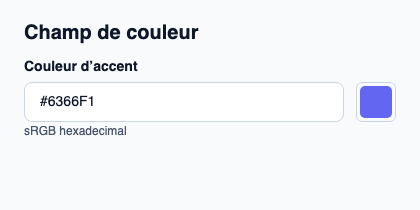
// Public label overrides localize this fixture; toolkit/host defaults keep their language.
// SPDX-License-Identifier: GPL-3.0-or-later
import { KitColorField, KitTheme, KitThemes } from "@kit/kit.slint";

export component Example inherits Window {
    title: "KitColorField — exemple";
    preferred-width: 420px;
    preferred-height: 210px;
    max-width: 100000px;
    max-height: 100000px;
    background: root.theme.canvas;
    in-out property <KitTheme> theme: KitThemes.light;
    in-out property <string> status;
    VerticalLayout {
        padding: 24px; spacing: 16px; alignment: start;
        Text { text: "Champ de couleur"; color: root.theme.text-primary; font-size: 20px * root.theme.text-scale; font-weight: 600; }
        KitColorField { theme: root.theme; label: "Couleur d’accent"; swatch: #6366f1; accepted-color: { red: 99, green: 102, blue: 241, alpha: 255 }; text: "#6366F1"; }
        if root.status != "": Text { text: root.status; color: root.theme.text-secondary; font-size: 12px * root.theme.text-scale; wrap: word-wrap; }
    }
}
API publique
Hérite de Rectangle.
Propriétés
| Nom | Type | Sens |
|---|---|---|
required |
bool |
in |
custom-validity |
string |
in-out |
validity |
KitValidityState |
out |
will-validate |
bool |
out |
validation-message |
string |
out |
theme |
KitTheme |
in |
control-size |
ControlSize |
in |
access |
FieldAccess |
in |
alpha-mode |
ColorAlphaMode |
in |
accepted-color |
SrgbColorView |
in |
swatch |
color |
in |
label |
string |
in |
error |
string |
in |
text |
string |
in-out |
picker-open |
bool |
out |
Types et variantes
| Type | Déclaration |
|---|---|
enum ColorAlphaMode |
opaque, editable |
enum ControlSize |
compact, medium, comfortable |
enum FieldAccess |
editable, read-only, disabled |
struct KitValidityState |
valid: bool, value-missing: bool, type-mismatch: bool, pattern-mismatch: bool, too-long: bool, too-short: bool, range-underflow: bool, range-overflow: bool, step-mismatch: bool, bad-input: bool, custom-error: bool, |
struct SrgbColorView |
red: int, green: int, blue: int, alpha: int |
Signaux
invalid()edited(string)commit-requested(string)cancelled()color-requested(SrgbColorView)
Fonctions
check-validity() → boolreport-validity() → boolset-custom-validity(message: string)reset-validation()open-picker()cancel-picker()take-focus()