
Cadre d’application pour Slint
KitAppShell · Slint Kit 0.3.1
Fond de fenêtre organisant les grandes régions d’une application.
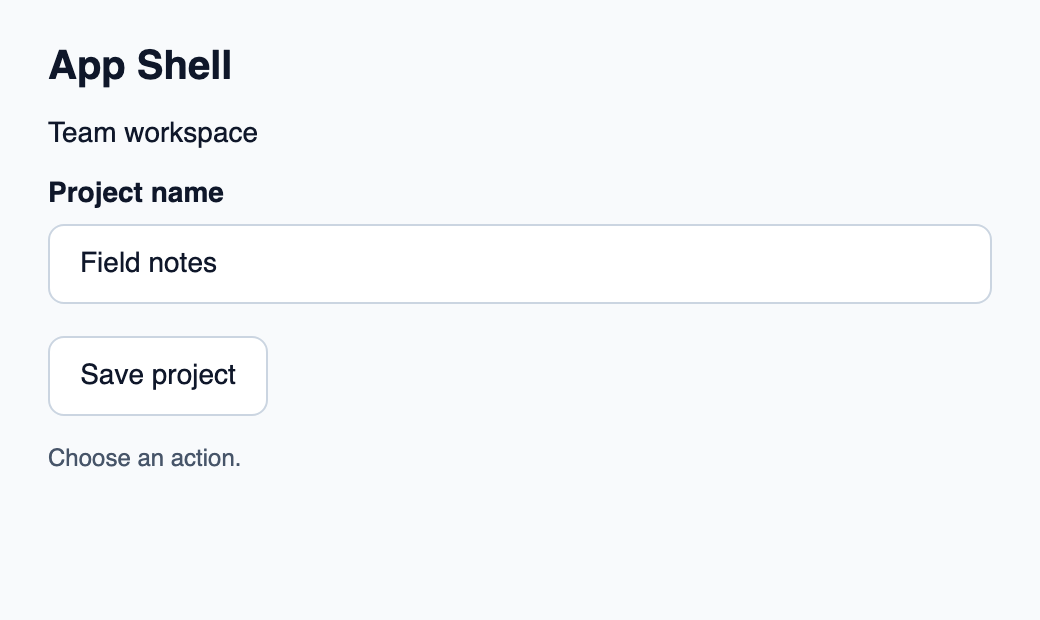
Essayer le composant
Télécharger le projet complet, le décompresser et lancer cargo run --locked dans son dossier. Rust 1.92+ ; Slint Kit 0.3.0 depuis crates.io. Vous pouvez aussi copier les quatre fichiers ci-dessous.
Cliquez sur Save project : Rust traite la commande et actualise le compteur d’actions.
ui/app.slint
export { KitFormValidation, HtmlInputKind, NumberInputFormat, KitInputConstraints, KitValidationResult, KitValidityState } from "@kit/kit.slint";
// SPDX-License-Identifier: GPL-3.0-or-later
import { KitAppShell, KitStack, KitButton, KitTextField, KitTheme, KitThemes } from "@kit/kit.slint";

export enum DemoAction { save-project }

export component App inherits Window {
    title: "KitAppShell example";
    preferred-width: 520px;
    preferred-height: 310px;
    max-width: 100000px;
    max-height: 100000px;
    background: root.theme.canvas;
    in-out property <KitTheme> theme: KitThemes.light;
    in-out property <string> draft-0: "Field notes";
    in property <string> status: "Choose an action.";
    callback action-requested(DemoAction);
    VerticalLayout {
        padding: 24px; spacing: 16px; alignment: start;
        Text { text: "App Shell"; color: root.theme.text-primary; font-size: 20px * root.theme.text-scale; font-weight: 600; }
        KitAppShell { theme: root.theme; KitStack { Text { text: "Team workspace"; color: root.theme.text-primary; font-size: 14px * root.theme.text-scale; wrap: word-wrap; }KitTextField { theme: root.theme; label: "Project name"; text <=> root.draft-0; }KitButton { theme: root.theme; text: "Save project"; activated => { root.action-requested(DemoAction.save-project); } } } }
        Text { text: root.status; color: root.theme.text-secondary; wrap: word-wrap; }
    }
}
src/main.rs
// SPDX-License-Identifier: GPL-3.0-or-later
use slint::ComponentHandle;
use std::cell::Cell;
slint::include_modules!();

fn main() -> Result<(), slint::PlatformError> {
    let app = App::new()?;
    slint_kit::init_form_validation!(self, app);
    let count = Cell::new(0_u32);
    let weak = app.as_weak();
    app.on_action_requested(move |action| {
        if let Some(app) = weak.upgrade() {
            let next = count.get().checked_add(1).expect("action count capacity");
            count.set(next);
            let label = match action {
                DemoAction::SaveProject => "Save project",
            };
            app.set_status(format!("{label} handled by Rust ({next})").into());
        }
    });
    app.run()
}
Cargo.toml et build.rs
Cargo.toml
[package]
name = "slint-kit-app-shell-example"
version = "0.1.0"
edition = "2024"
rust-version = "1.92"
license = "GPL-3.0-or-later"
publish = false

[dependencies]
slint-kit = "=0.3.0"
slint = { version = "=1.18.1", default-features = false, features = ["std", "compat-1-18", "backend-winit", "renderer-skia", "accessibility"] }

[build-dependencies]
slint-kit-build = "=0.3.0"

[workspace]
build.rs
fn main() {
    slint_kit_build::compile("ui/app.slint").expect("compile component example");
}
Fichiers : Cargo.toml · build.rs · ui/app.slint · src/main.rs
Placez l’en-tête, le contenu puis le pied de page comme enfants ordinaires. Choisissez quel enfant reçoit la hauteur restante avec son étirement vertical.
Le shell remplit son parent et peint theme.canvas. Il ne crée ni navigation ni défilement implicites.
Composition visuelle
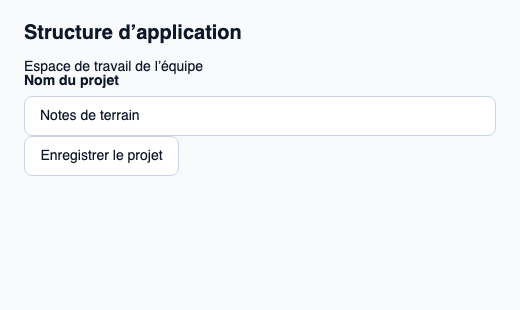
Le fichier ci-dessous produit la capture. Pour les composants pilotés par un contrôleur, il montre l’état affiché sans fournir le branchement Rust. Créer un projet.
Afficher le fichier de la capture
// Public label overrides localize this fixture; toolkit/host defaults keep their language.
// SPDX-License-Identifier: GPL-3.0-or-later
import { KitAppShell, KitButton, KitTextField, KitTheme, KitThemes } from "@kit/kit.slint";

export component Example inherits Window {
    title: "KitAppShell — exemple";
    preferred-width: 520px;
    preferred-height: 310px;
    max-width: 100000px;
    max-height: 100000px;
    background: root.theme.canvas;
    in-out property <KitTheme> theme: KitThemes.light;
    in-out property <string> status;
    VerticalLayout {
        padding: 24px; spacing: 16px; alignment: start;
        Text { text: "Structure d’application"; color: root.theme.text-primary; font-size: 20px * root.theme.text-scale; font-weight: 600; }
        KitAppShell { theme: root.theme;Text { text: "Espace de travail de l’équipe"; color: root.theme.text-primary; font-size: 14px * root.theme.text-scale; wrap: word-wrap; }KitTextField { character-count-label: "caractères"; checking-label: "Vérification…"; clear-label: "Effacer la recherche"; hide-label: "Masquer le mot de passe"; reveal-label: "Afficher le mot de passe"; theme: root.theme; label: "Nom du projet"; text: "Notes de terrain"; }KitButton { theme: root.theme; text: "Enregistrer le projet"; activated => { root.status = "Action demandée"; } } }
        if root.status != "": Text { text: root.status; color: root.theme.text-secondary; font-size: 12px * root.theme.text-scale; wrap: word-wrap; }
    }
}
API publique
Hérite de Rectangle.
Propriétés
| Nom | Type | Sens |
|---|---|---|
theme |
KitTheme |
in |
gap |
LayoutSpace |
in |
Types et variantes
| Type | Déclaration |
|---|---|
enum LayoutSpace |
none, tight, compact, regular, roomy, section |