
Carrousel pour Slint
KitCarousel · Slint Kit 0.3.1
Carrousel manuel présentant l’élément actif et ses actions.
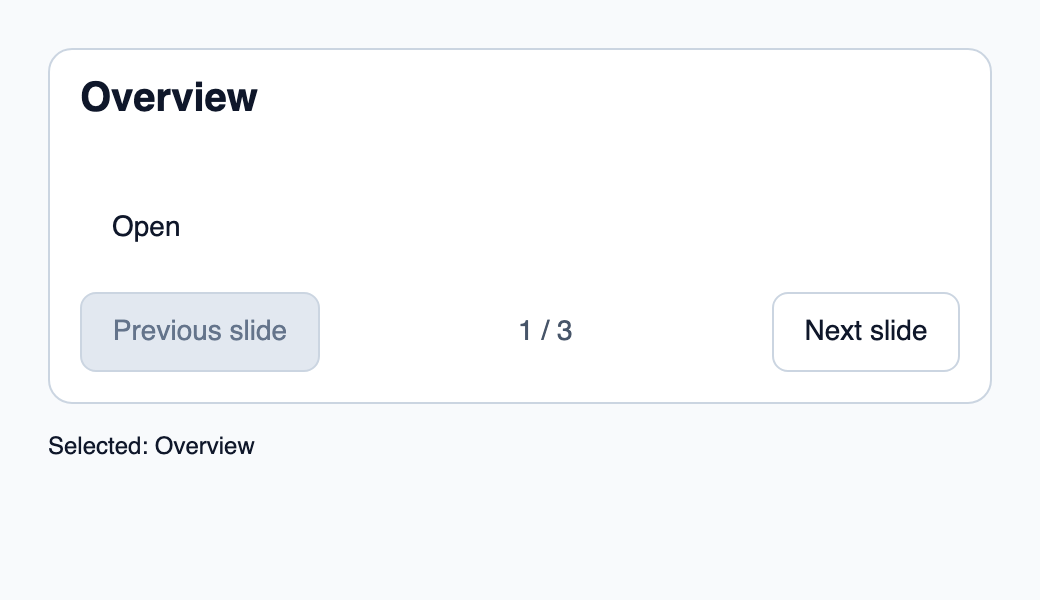
Essayer le composant
Télécharger le projet complet, le décompresser et lancer cargo run --locked dans son dossier. Rust 1.92+ ; Slint Kit 0.3.0 depuis crates.io. Vous pouvez aussi copier les quatre fichiers ci-dessous.
Utilisez Suivant pour montrer un autre élément, puis Ouvrir pour l’accepter dans Rust.
ui/app.slint
export { KitFormValidation, HtmlInputKind, NumberInputFormat, KitInputConstraints, KitValidationResult, KitValidityState } from "@kit/kit.slint";
// SPDX-License-Identifier: GPL-3.0-or-later
import { KitCarousel, OptionRow, SelectState, NavigationStep, CloseReason, SelectionAvailability, KitTheme, KitThemes } from "@kit/kit.slint";
export component App inherits Window {
    title: "KitCarousel example";
    preferred-width: 520px;
    preferred-height: 300px;
    max-width: 100000px;
    max-height: 100000px;
    background: root.theme.canvas;
    in-out property <KitTheme> theme: KitThemes.light;
    in property <[OptionRow]> rows;
    in property <SelectState> select-state;
    in property <string> selected-label: "Overview";
    in-out property <string> query;
    callback select-open();
    callback select-navigate(NavigationStep);
    callback select-activate(int, int);
    callback select-dismiss(CloseReason);
    callback select-query(string);
    callback select-typeahead(string);
    VerticalLayout {
        padding: 24px;
        spacing: 16px;
        alignment: start;
        control := KitCarousel {
            theme: root.theme; rows: root.rows; state: root.select-state; action-label: "Open";
            navigate(step) => { root.select-navigate(step); }
            activate(token, generation) => { root.select-activate(token, generation); }
        }
        result := Text { text: "Selected: " + root.selected-label; color: root.theme.text-primary; }
    }

}
src/main.rs
// SPDX-License-Identifier: GPL-3.0-or-later
use slint::ComponentHandle;
use slint_kit::{Ownership, SelectOption, SelectionIntent};
#[derive(Clone, Copy, PartialEq, Eq, Hash)]
enum Destination { Overview, Activity, Settings }
impl Destination {
    fn label(self) -> &'static str {
        match self { Self::Overview => "Overview", Self::Activity => "Activity", Self::Settings => "Settings" }
    }
}

mod ui { slint::include_modules!(); }
fn main() -> Result<(), slint::PlatformError> {
    let app = ui::App::new()?;
    slint_kit::init_form_validation!(ui, app);
    let selection = slint_kit::bind_select!(ui, app, vec![
        SelectOption::new(Destination::Overview, "Overview"),
        SelectOption::new(Destination::Activity, "Activity"),
        SelectOption::new(Destination::Settings, "Settings"),
    ], Some(Destination::Overview), Ownership::Local);
    let weak = app.as_weak();
    selection.on_intent(move |intent| {
        if let Some(app) = weak.upgrade() {
            app.set_selected_label(match intent {
                SelectionIntent::Commit(key) => key.label(),
                SelectionIntent::Clear => "No selection",
            }.into());
        }
    });
    selection.open();
    let persistent = selection.clone();
    app.on_select_activate(move |token, generation| {
        persistent.activate(token, generation);
        persistent.open();
    });
    app.run()
}
Cargo.toml et build.rs
Cargo.toml
[package]
name = "slint-kit-carousel-example"
version = "0.1.0"
edition = "2024"
rust-version = "1.92"
license = "GPL-3.0-or-later"
publish = false

[dependencies]
slint-kit = "=0.3.0"
slint = { version = "=1.18.1", default-features = false, features = ["std", "compat-1-18", "backend-winit", "renderer-skia", "accessibility"] }

[build-dependencies]
slint-kit-build = "=0.3.0"

[workspace]
build.rs
fn main() { slint_kit_build::compile("ui/app.slint").expect("compile component example"); }
Fichiers : Cargo.toml · build.rs · ui/app.slint · src/main.rs
Fournissez rows et state depuis le contrôleur et traitez navigate pour changer de diapositive. Définissez action-label lorsqu’un élément possède une action principale.
Le titre et la description viennent de l’option active ; les commandes sont désactivées aux extrémités. Une action transmet le token et la génération de l’élément affiché, sans rotation automatique.
Choisir entre une option intégrée et une composition personnalisée
Options partagées
label— propriété intégrée ; exemple de composition personnalisé
Composition visuelle
Le fichier ci-dessous produit la capture. Pour les composants pilotés par un contrôleur, il montre l’état affiché sans fournir le branchement Rust. Créer un projet.
Afficher le fichier de la capture
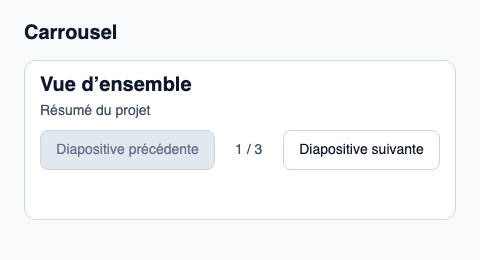
// Public label overrides localize this fixture; toolkit/host defaults keep their language.
// SPDX-License-Identifier: GPL-3.0-or-later
import { KitCarousel, KitTheme, KitThemes, SelectionAvailability } from "@kit/kit.slint";

export component Example inherits Window {
    title: "KitCarousel — exemple";
    preferred-width: 480px;
    preferred-height: 260px;
    max-width: 100000px;
    max-height: 100000px;
    background: root.theme.canvas;
    in-out property <KitTheme> theme: KitThemes.light;
    in-out property <string> status;
    VerticalLayout {
        padding: 24px; spacing: 16px; alignment: start;
        Text { text: "Carrousel"; color: root.theme.text-primary; font-size: 20px * root.theme.text-scale; font-weight: 600; }
        KitCarousel { empty-label: "Aucune diapositive"; label: "Carrousel"; next-label: "Diapositive suivante"; previous-label: "Diapositive précédente"; theme: root.theme; rows: [{ token: 11, generation: 1, label: "Vue d’ensemble", description: "Résumé du projet", disabled: false }, { token: 23, generation: 1, label: "Activité", description: "Modifications récentes", disabled: false }, { token: 38, generation: 1, label: "Réglages", description: "Préférences du projet", disabled: false }]; state: { open: false, generation: 1, active-index: 0, active: { present: true, token: 11 }, selected: { present: true, token: 11 }, selection-availability: SelectionAvailability.available }; activate(token, generation) => { root.status = "Activation demandée pour l’identifiant stable " + token; } }
        if root.status != "": Text { text: root.status; color: root.theme.text-secondary; font-size: 12px * root.theme.text-scale; wrap: word-wrap; }
    }
}
API publique
Hérite de Rectangle.
Propriétés
| Nom | Type | Sens |
|---|---|---|
label |
string |
in |
theme |
KitTheme |
in |
control-size |
ControlSize |
in |
rows |
[OptionRow] |
in |
state |
SelectState |
in |
previous-label |
string |
in |
next-label |
string |
in |
empty-label |
string |
in |
action-label |
string |
in |
Types et variantes
| Type | Déclaration |
|---|---|
enum ControlSize |
compact, medium, comfortable |
enum NavigationStep |
next, previous, first, last, page-next, page-previous |
struct OptionRow |
token: int, generation: int, label: string, description: string, disabled: bool |
enum SelectionAvailability |
absent, available, unavailable |
struct SelectionRef |
present: bool, token: int |
struct SelectState |
selection-availability: SelectionAvailability, selected: SelectionRef, active: SelectionRef, open: bool, active-index: int, generation: int |
Signaux
navigate(NavigationStep)activate(int, int)