
Texte d’accompagnement pour Slint
KitInputGroupText · Slint Kit 0.3.1
Texte secondaire aligné avec le contenu d’une saisie.
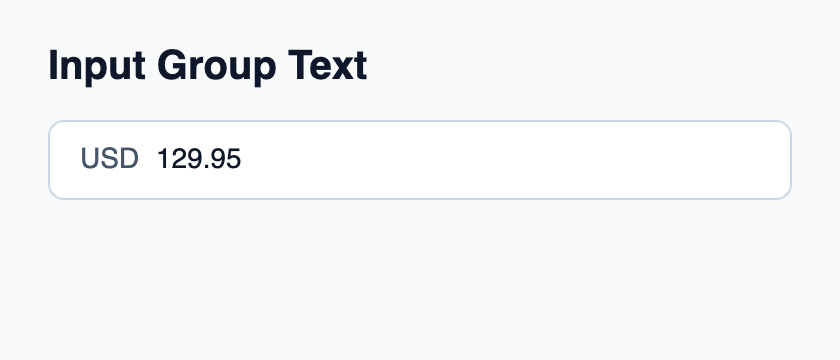
Essayer le composant
Télécharger le projet complet, le décompresser et lancer cargo run --locked dans son dossier. Rust 1.92+ ; Slint Kit 0.3.0 depuis crates.io. Vous pouvez aussi copier les quatre fichiers ci-dessous.
Cliquez sur le champ natif et modifiez son texte ; le préfixe ou suffixe reste séparé de la valeur éditable.
ui/app.slint
export { KitFormValidation, HtmlInputKind, NumberInputFormat, KitInputConstraints, KitValidationResult, KitValidityState } from "@kit/kit.slint";
// SPDX-License-Identifier: GPL-3.0-or-later
import { KitInputGroup, KitInputGroupText, KitTheme, KitThemes } from "@kit/kit.slint";

export component App inherits Window {
    title: "KitInputGroupText example";
    preferred-width: 420px;
    preferred-height: 180px;
    max-width: 100000px;
    max-height: 100000px;
    background: root.theme.canvas;
    in-out property <KitTheme> theme: KitThemes.light;
    in-out property <string> draft-0: "129.95";
    VerticalLayout {
        padding: 24px; spacing: 16px; alignment: start;
        Text { text: "Input Group Text"; color: root.theme.text-primary; font-size: 20px * root.theme.text-scale; font-weight: 600; }
        KitInputGroup {
            theme: root.theme; focused: editor.has-focus;
            HorizontalLayout {
                spacing: 8px;
                KitInputGroupText { theme: root.theme; text: "USD"; }
                Rectangle {
                    horizontal-stretch: 1; min-width: 0px; clip: true;
                    viewport := Flickable {
                        interactive: false;
                        content-width: max(self.width, editor.preferred-width + 2px);
                        content-height: self.height;
                        editor := TextInput {
                            width: viewport.content-width; height: viewport.height;
                            single-line: true; input-type: InputType.decimal;
                            accessible-label: "Amount";
                            font-size: 14px * root.theme.text-scale;
                            horizontal-alignment: left; vertical-alignment: center;
                            text <=> root.draft-0; color: root.theme.text-primary;
                            cursor-position-changed(position) => {
                                if (position.x + viewport.content-x < 0px) {
                                    viewport.content-x = -position.x;
                                } else if (position.x + 2px + viewport.content-x > viewport.width) {
                                    viewport.content-x = viewport.width - position.x - 2px;
                                }
                            }
                        }
                    }
                }

            }
        }
    }
}
src/main.rs
// SPDX-License-Identifier: GPL-3.0-or-later
slint::include_modules!();

fn main() -> Result<(), slint::PlatformError> {
    let app = App::new()?;
    slint_kit::init_form_validation!(self, app);
    app.run()
}
Cargo.toml et build.rs
Cargo.toml
[package]
name = "slint-kit-input-group-text-example"
version = "0.1.0"
edition = "2024"
rust-version = "1.92"
license = "GPL-3.0-or-later"
publish = false

[dependencies]
slint-kit = "=0.3.0"
slint = { version = "=1.18.1", default-features = false, features = ["std", "compat-1-18", "backend-winit", "renderer-skia", "accessibility"] }

[build-dependencies]
slint-kit-build = "=0.3.0"

[workspace]
build.rs
fn main() {
    slint_kit_build::compile("ui/app.slint").expect("compile component example");
}
Fichiers : Cargo.toml · build.rs · ui/app.slint · src/main.rs
Définissez text pour afficher une unité, un préfixe ou un suffixe dans KitInputGroupStart ou KitInputGroupEnd. Gardez la valeur éditable dans l’éditeur natif.
Le texte utilise la typographie des contrôles et se centre verticalement. Il conserve une largeur naturelle sans devenir un champ indépendant.
Composition visuelle
Le fichier ci-dessous produit la capture. Pour les composants pilotés par un contrôleur, il montre l’état affiché sans fournir le branchement Rust. Créer un projet.
Afficher le fichier de la capture
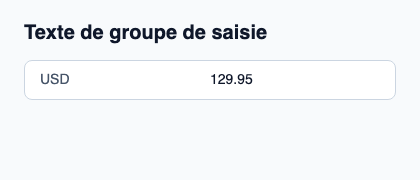
// Public label overrides localize this fixture; toolkit/host defaults keep their language.
// SPDX-License-Identifier: GPL-3.0-or-later
import { KitInputGroup, KitInputGroupText, KitTheme, KitThemes } from "@kit/kit.slint";

export component Example inherits Window {
    title: "KitInputGroupText — exemple";
    preferred-width: 420px;
    preferred-height: 180px;
    max-width: 100000px;
    max-height: 100000px;
    background: root.theme.canvas;
    in-out property <KitTheme> theme: KitThemes.light;
    in-out property <string> status;
    VerticalLayout {
        padding: 24px; spacing: 16px; alignment: start;
        Text { text: "Texte de groupe de saisie"; color: root.theme.text-primary; font-size: 20px * root.theme.text-scale; font-weight: 600; }
        KitInputGroup { theme: root.theme; HorizontalLayout { spacing: 12px; KitInputGroupText { theme: root.theme; text: "USD"; } TextInput { font-size: 14px * root.theme.text-scale; vertical-alignment: center; text: "129.95"; color: root.theme.text-primary; }  } }
        if root.status != "": Text { text: root.status; color: root.theme.text-secondary; font-size: 12px * root.theme.text-scale; wrap: word-wrap; }
    }
}
API publique
Hérite de Text.
Propriétés
| Nom | Type | Sens |
|---|---|---|
theme |
KitTheme |
in |